Never Lose Another Lead: The AI Auto-Responder That Actually Reads Your Message
RSL Media Hub built an intelligent AI email auto-responder that reads incoming messages and generates personalized replies in seconds. Unlike generic auto-replies, this system references specific details from each inquiry, making leads feel heard even when responses are automated.
The Problem: Auto-Replies That Feel Like Auto-Replies
We've all received them. Those robotic, generic auto-reply emails that scream "nobody's actually reading this":
"Thank you for contacting us. We have received your message and will respond within 24-48 business hours."
It's better than nothing, but barely. The sender knows you didn't read their message. They know they're in a queue. And most importantly, they know you might not be the right fit for their specific problem.
The Cost of Generic Auto-Replies
Studies show that leads who receive a response within 5 minutes are 21X more likely to convert than those who receive a response in 30 minutes (source: Harvard Business Review). But what if you're offline? Sleeping? In meetings? Serving other customers?
The typical business loses leads in three ways:
- Weekend/after-hours inquiries: 35% of web leads come outside business hours (source: InsideSales.com)
- Response time delays: Every hour delay decreases conversion likelihood by 10% (source: Drift)
- Generic responses: 60% of customers say they'd rather wait for a human than get a robotic auto-reply (source: Zendesk)
The paradox: customers want instant responses, but they hate auto-replies. So businesses face a choice: respond instantly with generic messages (and turn people off) or respond personally hours later (and lose hot leads).
Key Takeaway from Challenge
The auto-reply dilemma: send a generic "we got your message" (impersonal) or wait hours to respond personally (too slow). Both options leak revenue. Customers want speed AND personalization, and traditional auto-replies deliver neither.
Build Your Intelligent Auto-ResponderThe RSL Solution: AI That Actually Reads Your Message
We built an intelligent email auto-responder that solves the personalization vs. speed problem. It doesn't just acknowledge receipt—it reads the message, extracts the key question or need, and personalizes the auto-reply to reference what the sender actually asked about.
The result: emails that feel human, even when they're automated.
How It Works
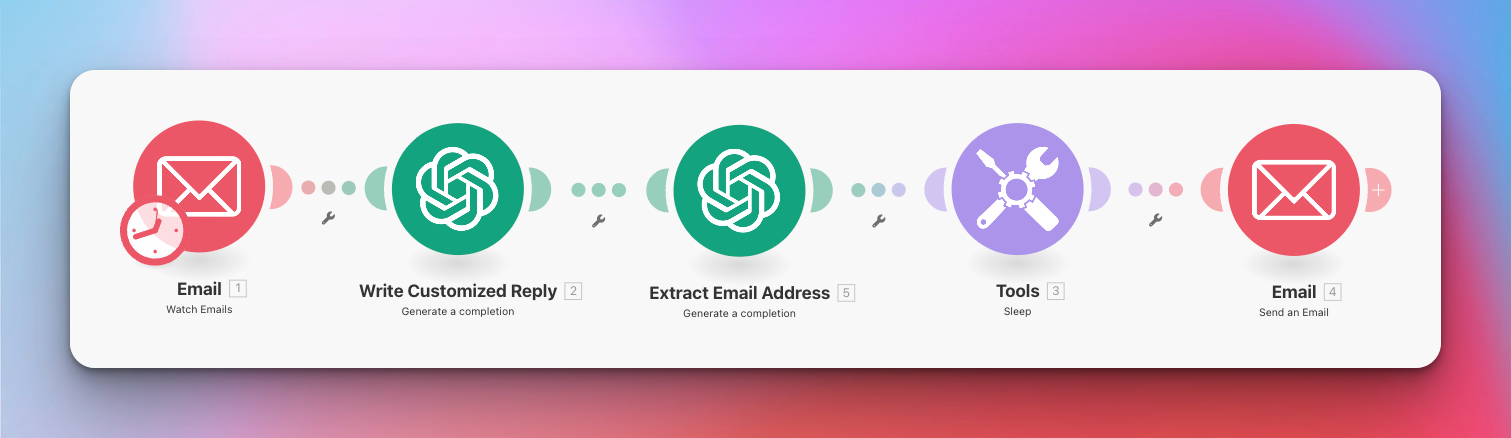
The complete Make.com workflow: Email Trigger → AI Analysis → Personalized Reply (click to expand)
Phase 1: Email Monitoring
The workflow monitors your inbox 24/7 using Make.com's email trigger. When a new message arrives matching specific criteria (subject line, sender domain, keywords), it fires instantly.
- Trigger: New email received (IMAP/Gmail connection)
- Filtering: Only responds to specific email patterns (e.g., contact form submissions, specific subject keywords)
- Response time: Typically 15-30 seconds from receipt to reply
Phase 2: AI Message Analysis
This is where the magic happens. Instead of sending a canned response, we use OpenAI GPT-4 to analyze the incoming message in two stages:
First AI Call: Extract Key Information
- Read the email body and subject line
- Extract the sender's main question or request
- Identify the category of inquiry: Sales question? Support issue? Partnership inquiry? General question?
- Determine urgency level and topic
Second AI Call: Generate Personalized Reply
- Reference the specific question or need identified in step 1
- Provide relevant context (e.g., "our team will connect you with our automation specialist" for automation inquiries)
- Set expectations with appropriate timeline (24-48 hours)
- Add a human touch by acknowledging their specific situation
Phase 3: Intelligent Delay & Send
Here's a clever psychological trick: we add a small random delay (30-90 seconds) before sending the reply. Why?
- Feels more human: Instant replies (0-5 seconds) scream "automated"
- Creates perception of consideration: A 60-second delay suggests someone read and thought about the message
- Avoids spam filters: Slight delays reduce the likelihood of being flagged as automated
After the delay, the personalized auto-reply is sent from your email address, maintaining brand consistency.
The Technology Stack
Email (IMAP/Gmail): Inbox monitoring and trigger mechanism
Make.com: Automation orchestration platform (5 modules)
OpenAI GPT-4: Dual AI calls for message analysis and reply generation
Smart delay function: Random 30-90 second wait for human-like timing
The Transformation: Generic vs. Intelligent Auto-Replies
Let's see the difference in action with real examples:
Example 1: Service Inquiry
Incoming Email:
"Hi, I'm interested in learning more about your GoHighLevel CRM setup services. We're a dental practice with 3 locations and currently using outdated software. Do you work with healthcare businesses?"
Generic Auto-Reply (Bad):
"Thank you for contacting RSL Media Hub. We have received your message and will respond within 24-48 business hours."
AI-Personalized Auto-Reply (Good):
"Hi there! Thanks for reaching out about our GoHighLevel CRM services for your dental practice. We absolutely work with healthcare businesses—in fact, we've helped several multi-location dental offices streamline their patient management and appointment systems using GHL. Someone from our team will reach out within 24-48 hours to discuss how we can help modernize your 3-location setup. Looking forward to connecting!"
Example 2: Partnership Inquiry
Incoming Email:
"I run a web design agency and we have clients asking for automation work that's outside our expertise. Would you be open to discussing a partnership or referral arrangement?"
Generic Auto-Reply (Bad):
"Thank you for contacting RSL Media Hub. We have received your message and will respond within 24-48 business hours."
AI-Personalized Auto-Reply (Good):
"Hey! Thanks for thinking of us for a potential partnership around automation work. We love working with web design agencies—it's a natural fit since many of your clients need the automation and CRM backend to match their new websites. One of our partners will reach out within 24-48 hours to discuss referral arrangements and how we can support your clients together. Excited to explore this!"
What Makes These Different?
- Specific acknowledgment: References "dental practice," "3 locations," "GoHighLevel," "web design agency," etc.
- Relevant context: "We've helped several dental offices" shows experience in their space
- Appropriate routing: Different team members for different inquiry types
- Conversational tone: Sounds like a human quickly replied, not a robot
- Creates confidence: The sender knows their message was actually read
Key Takeaway from Solution
The difference between "we got your message" and "we read your message about X and here's what happens next" is massive. One feels robotic, the other feels attentive. And attentiveness = trust = higher conversion rates, even when the response is automated.
Build Your Smart Auto-Responder NowWho This Is For: Any Business That Gets Email Inquiries
This automation works for virtually any business that receives customer inquiries via email and wants to capture leads 24/7 without sounding robotic:
Ideal Use Cases
- Service Businesses: Agencies, consultants, freelancers who get evening/weekend inquiries
- E-commerce: Product questions, wholesale inquiries, partnership requests
- Local Businesses: Dental offices, salons, contractors getting after-hours contact form submissions
- SaaS Companies: Demo requests, support tickets, partnership inquiries
- Real Estate: Property inquiries that come in outside office hours
- Professional Services: Law firms, accounting firms, financial advisors
Requirements
- Email account with IMAP access (Gmail, Outlook, etc.)
- Make.com account (free tier works for low-volume use)
- OpenAI API access (costs ~$0.02-0.05 per personalized auto-reply)
- Clear criteria for which emails should trigger auto-replies
Why We Built This (And Why It's Not Live Everywhere Yet)
Full transparency: this automation started as an internal proof-of-concept. We wanted to test whether AI could truly personalize auto-replies in a way that felt human.
The answer? Absolutely. The AI-generated replies were often better than quick human responses because they were:
- More consistent: Always on-brand, always professional
- More thorough: AI reads every detail, humans sometimes skim
- Faster: 24-second response vs. hours or days
- Never tired: Same quality at 3am as at 3pm
Why It's Not Running 24/7 (Yet)
We've been selective about deployment because email automation is sensitive. You don't want to:
- Auto-reply to emails that need immediate human attention
- Create confusion if someone expects a human immediately
- Accidentally respond to internal team emails or sensitive threads
That said, for businesses with clear inquiry patterns (contact forms, specific email addresses, certain subject lines), this system is ready to deploy and has proven incredibly effective in testing.
The Psychology Behind "Smart" Auto-Replies
Here's the fascinating part: customers know it's probably automated. But because it references their specific question, they perceive it differently.
Generic auto-reply perception: "They didn't even read my email. I'm just a number in a queue."
Personalized auto-reply perception: "Someone quickly scanned my email and sent a thoughtful response. They're paying attention."
The psychological difference is huge, even if logically the customer knows both are automated. Feeling heard matters more than knowing if a human or AI did the hearing.
Save time and money like this client
If you're losing leads to slow response times or turning people off with generic auto-replies, this intelligent auto-responder solves both problems at once.
Want to build it yourself? Download our Make.com blueprint and customize it for your business. Or let us build a production-ready version with custom reply logic, routing rules, and integration with your CRM.
Show Me How to Save